How to search inside a YouTube video
To find a moment, search the transcript of the video. Every line has a time, so one click takes you to the place where the word was said.
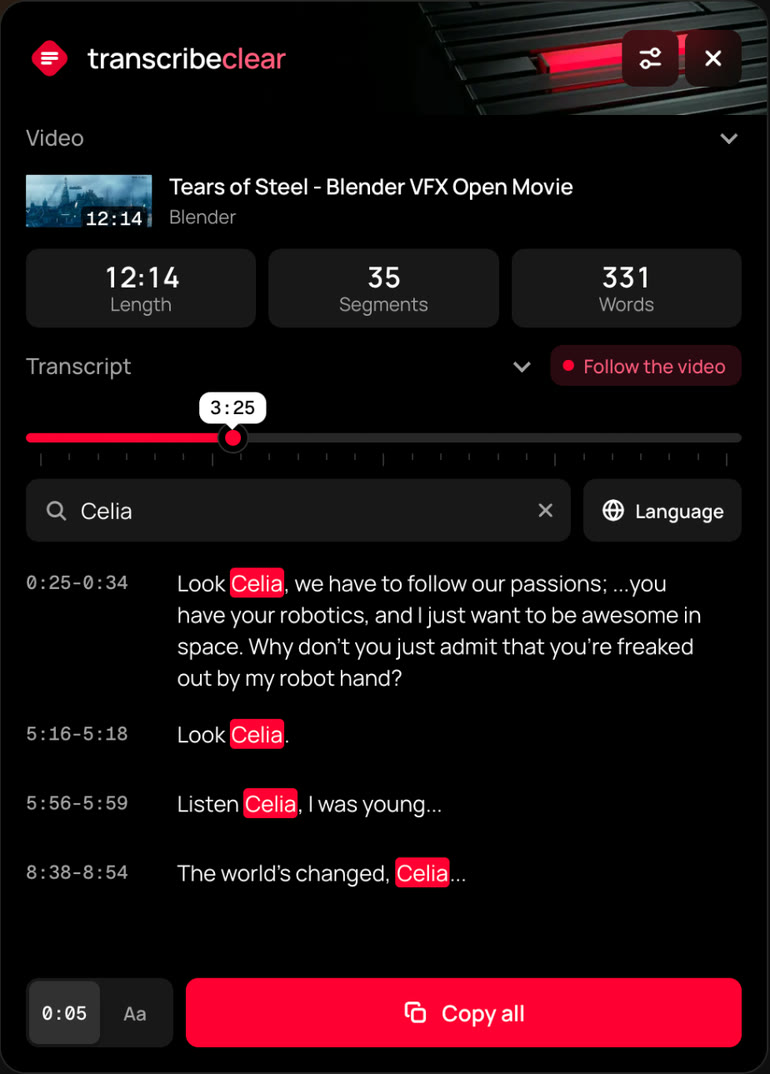
Find a word with TranscribeClear
- Add TranscribeClear to Chrome or Firefox and open the video.
- Press Show text, or click the extension icon.
- Type a word in the search field. Matching lines are highlighted.
- Click a line, and the video jumps to that moment.
While the video plays, the current line follows it, so you can read along.
Find a word on YouTube without an extension
- Open the description under the player and press Show transcript.
- Press Ctrl+F, or Cmd+F on a Mac, and type the word.
- Click the line you found to jump to that moment.
Browser search may not reach every line of a long transcript, because YouTube can load the list in parts.
Search depends on the subtitles
Automatic subtitles can contain mistakes. If a word is not found, try a shorter form of it or a word with a similar meaning.